Throwing Out Old Software
Fear not faithful reader(s), blog updates were only postponed, not suspended indefinitely due to the holidays and a busy end-of-year work schedule. Look for the approximately once-a-month pace to continue in the new year. In 2007, this entry will be the 11th of the year, which is a little bit under my desired mark, but a respectable showing.
Out with the old, in with the new… Software. And gadgets. And games. And clothes.
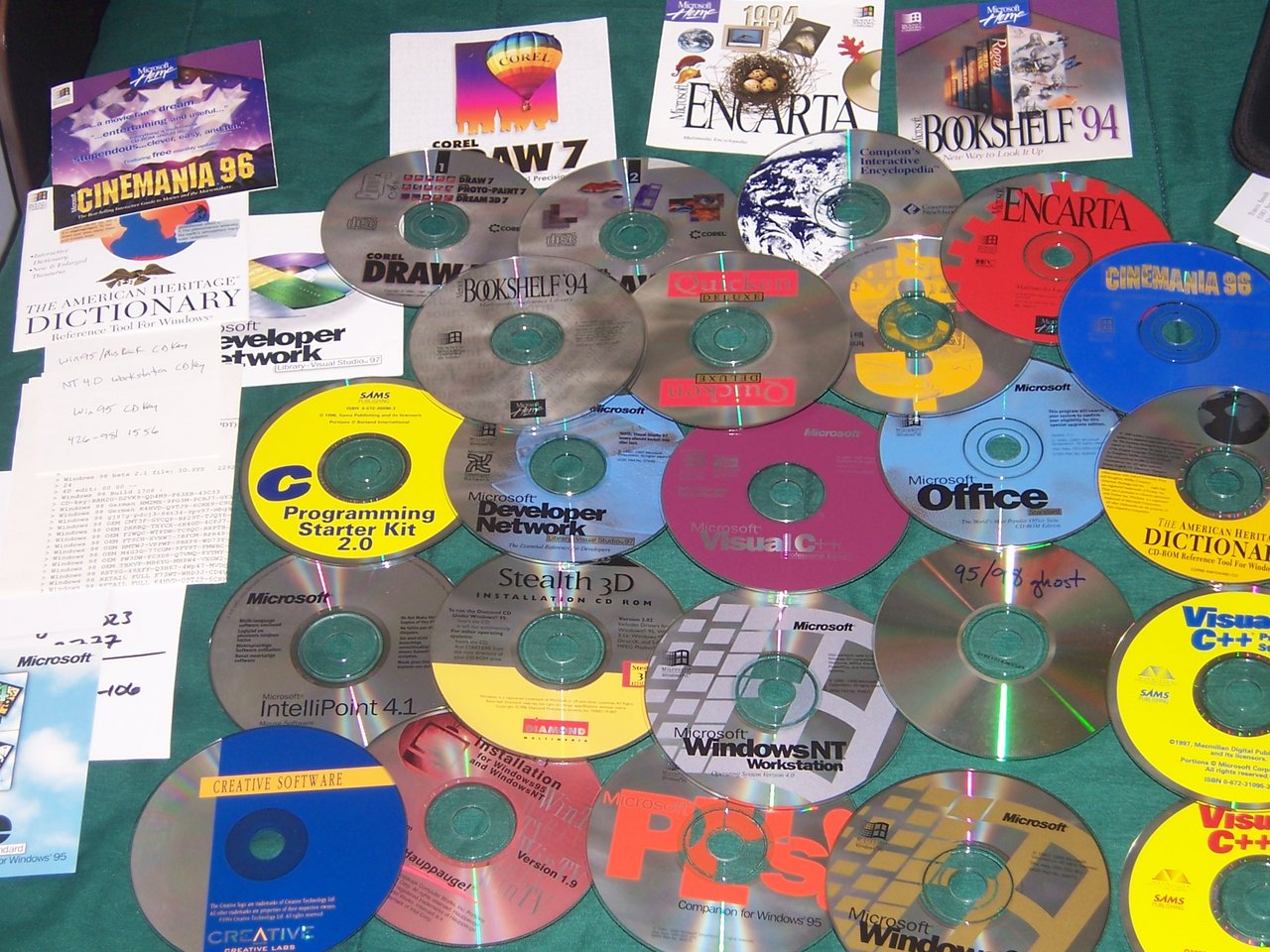
I was making room for new goodies, and decided to clean my CD holders of office software that I hadn’t touched in over a year.
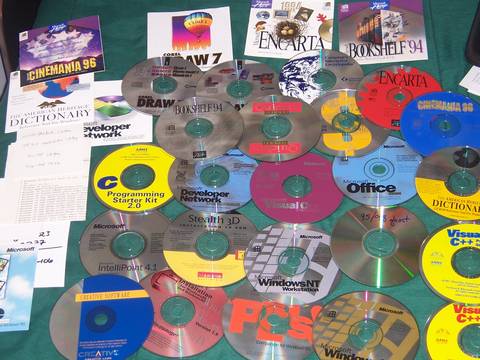
It was instructive to see what I decided wasn’t worth keeping and why. Ordered roughly by columns from left to right:
- Cinemania - great for 1996, superceded by IMDB / movies.yahoo.com
- American Heritage Dictionary - m-w.com, and even Ctrl-Apple-D on newer versions of OSX
- MSDN - msdn.com and avoiding Microsoft development tools when possible
- Misc CD Keys - without these, the CD’s might as well be useless
- MS Office ‘95 - peeking out the side, superceded by OpenOffice.org
- Corel Draw 7 - Corel, how I loved you. I even bought your Linux version. Thanks for the memories. For now, I use InkScape.
- Bookshelf ‘94 - wikipedia, project gutenberg
- C Programming Starter Kit - GCC, Linux
- MS IntelliPoint 4.1 - Umm, Linux?
- Creative Labs Driver CD - Linux, laptops, onboard sound.
- More MSDN - as above
- Stealth 3D - Obsoleted first by 3DFX, then ATI, then nVidia.
- Hauppauge WinTV - I actually still have this card, probably have had it for ~10 years and it still works pretty well. Linux drivers made the drivers CD for this card even more obsolete than it already was.
- Quicken Deluxe - online banking
- MS Visual C++ - GCC, Python, Glade, Eclipse, etc.
- Windows NT Workstation - my OS of choice before I dove into Debian. Now OSX is for home, Debian / Ubuntu for data processing and development.
- MS Plus Pack ‘95 - I honestly don’t have any excuses for this.
- Encarta - wikipedia
- Comptons Interactive Encyclopedia - wikipedia
- More Quicken - more online banking
- MS Office - OpenOffice, etc.
- Windows 95/98 Ghost Images - the funny story behind this one is that I tried installing my copy of Windows 95 on a computer with a 60gb hard drive. This turned out to be impossible, with Win95 thinking I had like -20gb of drive space (or something ridiculous). Newer versions of the 95 installer supported larger drives, but yada-yada-yada, CD-keys, etc. I think after getting ‘95 installed, I said to myself: “Self, this is just not worth it” and went back to Linux.
- Windows 95 CD - as above. Now I use DosBox and Wine to get access to most old programs.
- Cinemania - as above
- Dictionary - as above
- More C++ Compilers - as above
A common thread in here is online delivery or web-based services. Another one is that proprietary data formats are bad and lead to bit-rot. It’d be nice to be able to crack open some of the data files of Encarta or Cinemania. I am very glad I don’t have to worry (as much) about CD keys or similar.
I fear that online accounts are going to similarly go the way of the dodo (ie: logging in, passwords, etc), and online-services might also be subject to the same risks as bit-rot (call it “net-rot”).
Without the internet, a lot of the above reference software would still be extremely useful, but bit-rot has gotten the best of it. Wine is making excellent progress and I’m actually pretty sure that things like Cinemania would run on there, but alas the CD’s are long gone and I didn’t think to try them out.
The lessons here are that personally-controlled backups in ~durable~ file-formats (be they proprietary or otherwise) are essential. Even if you can’t get 100% fidelity, it might be worth it to back up your personal files in more than one file-format. I know I’ve had problems converting work I did in *.cdr files from Corel Draw into something more useable on modern systems. In addition, supporting open (or at least documented) file formats would also be worthwhile. Otherwise 10 years from now you’ll be staring down at a bedspread full of CD’s of software that you can’t use- wondering what it means and how are you going to open your pictures or family newsletters or vacation videos.
Good luck in the New Year!
13:24 CST | category / entries
permanent link | comments?
Perl and a few other tips
So it turns out that perl is not as bad as I always thought it to be.
You might be familiar with “perl pie”, which is a “program, inplace, execute”. In some cases I’m finding it to be far superior to sed, because it’s regular expressions don’t suck. Notably, you can do the following:
perl -p -i -e 's/\r/\n/g' ...file...
This will convert line endings in place.
Another handy-dandy tip from the grab-bag is that Mozilla FireBug’s “*.toSource()” function takes an optional parameter, which appears to mean: “print functions with some semblance of indentation”. It is extremely nice when trying to inspect the behaviour of code or a function without resorting to debug( fnRef ); fnRef( myArgs );.
And while on the topic of FireBug, you can also use the inspect( domRef ); to pull you directly over to the element in question using it’s built-in DomViewer.
18:57 CST | category / entries
permanent link | comments?
Staples, OfficeMax, the Brother 7820N and Linux
A tale of two online stores. Act One. Find nice multifunction laser printer. Find good price on multifunction laser printer at OfficeMax (~$199). Place order. Wait a week. Call OfficeMax phone-line (which answered to a real-live person in approximately 3 rings). Backordered.
Receive assurances that “BACKORDERED” means that it’ll be coming in another 1-3 days. Wait another week. No printer. Call again (again, answers in 3 rings). Oops, didn’t you get the email? (no) We couldn’t find that printer, so sorry, order cancelled.
Act Two. Find same printer at better price at Staples.com ($199 w/ $50 rebate, rebate pending). Place order. Call phone support (to make sure they actually have it). End up waiting a minute or two on hold, but they assure me they’ve got plenty.
Act Three. Printer comes, right when they said it would. Plug printer in to Ubuntu (via USB), find-printer dialog finds it right away. Brother has a linux-driver page (woot!), instructions are sane and have downloads for both RedHat and Debian flavors. Sane/Scanning support is slightly PITA because it requires those binary drivers, and because of permissions issues (scanning as root works, but not as normal users).
Google to the rescue, and some unix-fu later gets me the following line I need to put into udev rules, and everything magically works right:
# Brother MFC 7820n
SYSFS{idVendor}=="04f9", SYSFS{idProduct}=="0181", MODE="664", GROUP="scanner"
…with the caveat that UDEV APPEARS TO BE CASE-SENSITIVE IN ITS HEX STRINGS. ZOMG. This is about the only thing that prevents all this from being granny-compatible. Marvel at how far we have come.
22:24 CST | category / entries
permanent link | comments?
One Semester of Spanish
Updates, get your updates. To the left you will find imported RSS feeds from del.icio.us and video.yahoo.com. The del.icio.us stuff is basically stuff that I either want to find again, or looks interesting but I don’t have time to read. You’ll have to subscribe to them individually until I can figure out awesome RSS aggregation or similar. I try to push at least one blog entry a month (and two if I skip a month :^) - if you visit my page at least once a month, you’ll find that the links on the left get little asterisks if they’ve been recently added.
I’ve got more guitar recordings going, I’m getting geometrically better at recording good “takes” of the songs… the first time took 10, the next time took ~5, the most recent ones took between 1 and 3 (yes, one take!!!). I will post them as bandwidth and time allows.
For now, you should check out this spanish love song… I must learn it so I can sing to Bety.
link
17:44 CST | category / entries / links
permanent link | comments?
Boned By Apple
Phatpod iPod Nano - Like your sleek device for workouts? Too bad, go get a
Shuffle - BONED
$.99 ringtone on top of $.99 to buy the song (certain songs only) - BONED
Starbucks “integration” - now my iPhone will spend a few extra seconds every
time I hook up to a Wifi access point looking for coffee music - BONED
We managed to fit really nice HDs in iPods, but not the new Touch iPod - but you
get a few millimeters back - BONED
$599 to $399 price drop in 2 months → EXTREMELY BONED
[source…]
Great comment on slashdot, pretty much sums up my feelings on the matter. Actually there was another one that I can’t be bothered to find now:
“Big Storage (iPod-classic) == Small Screen. Big Screen (iPod-touch) == Small Storage (iPod-touch).”
Plus I can’t imagine myself pulling out my iPod-touchtm while on the couch at home to check what the weather is. Serious WTF-age.
Anyway, most likely my home network changes will be as follows:
- Drop old printer, old scanner, old desktop
Printer is inkjet and starting to go bad and scanner keeps flaking out. The hard-drives on my big burly desktop linux box (AMD 1.5ghz - lol) keep trying to die, and it is time to move on. Plus everything takes up too much space and I hardly ever even turn on the desktop anymore, using the 1.33ghz PowerBook for 90% of my at-home stuff.
- Buy laser-multifunction device (print/scan/copy/fax)
For less than $200 I can get an all-in one laser MFD that works with Mac, Linux. It’s those standard office things, larger than the nice small inkjet ones, but it’s a laser!
- Replace Big Linux Desktop with Litle Linux Laptop
It plays music. It has access to the network. It’s battery does not work but it was free.
- Buy Airport Express (for use with 160gb USB2.0 HD)
It is a wireless router. It shares a USB2.0 Hard Drive over wireless(!), and/or printers, as well as supports wired connection. It is only a bit more expensive and does a bunch more than the old NSLUG which died a mysterious death once upon a time.
- Connect XBox to Airport
Airport + HD becomes the new home for my iTunes Library, which the XBox can access over the network (fingers crossed!).
- Buy new iPod-classic
I’ll have to spool all songs over to MP3 instead of OGG in order to listen to them on the iPod (damn you de-facto standards!), but if all my music now ‘lives’ on the shared hard-drive I can afford to keep two copies of it, in both MP3 and original OGG’s. I probably won’t even use all of the 80gb, but $249 v. $349 … the extra 80gb tempts me even if I just dedicate that portion to mobile/portable backup.
- iPod → TV + Remote
It can also play music, shows photos, plays music videos, etc, etc.
Ideally this will let me:
- Make copies w/ the MFD, no computer necessary(tm)
- Play my music on my TV and in my Car and at Work (yay!)
- Take up a less space and be more convenient
Here’s to progress and finally giving in to the AAPL machine.
00:21 CST | category / entries
permanent link | comments?
How does JavaScript Suck?
Let me count the ways:
>>> 1 ? "yes" : "no"
"yes"

>>> 0 ? "yes" : "no"
"no"

>>> "1" ? "yes" : "no"
"yes"

>>> "0" ? "yes" : "no"
"yes"

>>> Number("1") ? "yes" : "no"
"yes"

>>> Number("0") ? "yes" : "no"
"no"

>>> Number("true") ? "yes" : "no"
"no"

function DoWhatIMean( pString )
{
   if ( typeof pString === 'string' )
   {
      return pString.toLowerCase() == "true" ?
         true : Number(pString) ? true : false
   }
   else
   {
      return Number(pString) ? true : false
   }
}

>>> DoWhatIMean( "true" ) ? "yes" : "no"
"yes"

>>> DoWhatIMean( "false" ) ? "yes" : "no"
"no"
Welcome to 2007.
Note, I even originally had two rookie mistakes in “DoWhatIMean” - did not “*.toLowerCase()” it, and also did not check to see if it was a string first. Ugh.
13:25 CST | category / entries
permanent link | comments?
The Nexus of Etude (by Carulli)
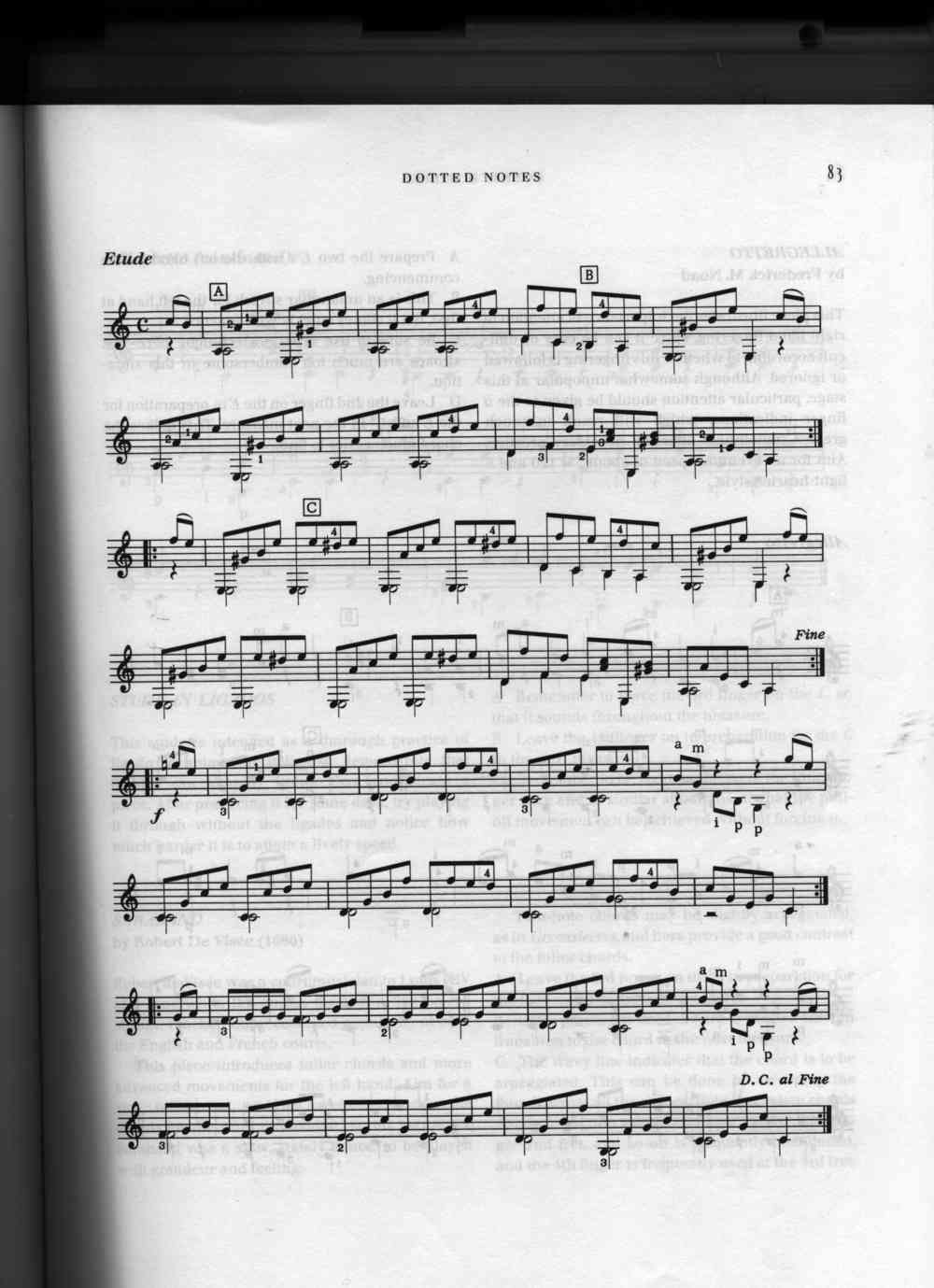
I’ve been taking guitar lessons since about March ‘06, and had my first guitar since January ‘06. It’s been a long road, but reasonably fruitful and productive. Here is the journey of me playing a Study (Etude) by Fernando Carulli, with a slight detour to the land of midi and sheet music.
First you start with Frederick M. Noad’s Solo Guitar I, a thorough and excellent introduction to learning guitar and eventually you get to Etude.
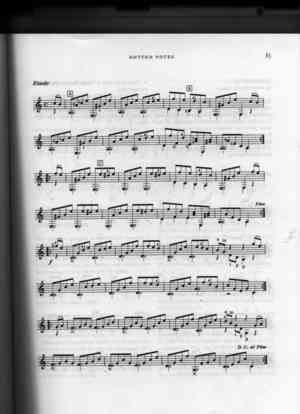
Here is the song transcribed into Lilypond notation, and it’s corresponding output (available in both PNG and PDF).
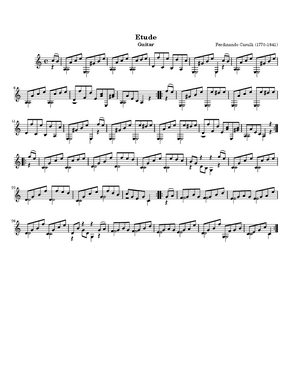
Lilypond will also let you export to midi, here’s what the song sounds like when a computer plays it: in MIDI, and mp3 formats.
Now you can see me actually perform the song with both of my guitars. The first guitar is the one I found in the Mercado de Balderas in Mexico, D.F. It’s kindof a darker brown guitar with light trim, made of cedar, very lightweight, and has been a great guitar for me to learn on. Only after more than a year of practice have I been able to play ~better than~ the guitar (ie: where the guitar has been holding me back).
Or just listen to the song on the old guitar.
Next is the performance with my new guitar. I got it for my birthday last year when we went to Paracho, Mexico (self-proclaimed Guitar Capital of the World). It’s a bit lighter in color, but a much heavier wood- made of palo-escrito, or “Mexican Rosewood”. It has a richer tone, and plays a lot louder than my first guitar.
Or just listen to the song on the new guitar.
There are mistakes in both of them, and they represent the best of ~9-10 takes (each), but should be enough so you can hear the difference between the two guitars, and see the process that someone has to go through in order to entertain you with even the simplest of songs. One thing that learning to play the guitar has taught me is to appreciate so much more the effort that goes into making music, especially when playing live.
22:26 CST | category / entries
permanent link | comments?
DallasPHP Unit Testing presentation
Yesterday I gave a presentation on unit testing to the local PHP user-group. It went over pretty well although I had to jump around a little bit more than I would have liked. Presentation and assets are dowloadable here, or check it out locally (I did it using S5 preso framework).
The discussion afterwards was good (as always), and if you’re in the area, don’t forget that they do an informal thing at NerdBooks the Saturday after meetings. So be there and be square. :^)
09:24 CST | category / entries
permanent link | comments?
Sheet Music and Midi
In my continuing investigations of sheet-music programs and midi libraries I’ve learned a few surprising things.
(Professional) Sheet Music is Hard
So most guitar people on the internet do Tablature. Tabs are relatively easy to read and write, but also very lossy compared to a good musical score. You lose note duration right away, and then you end up with thinks like “2h3p2” to describe a hammer-on / pull-off or a ligado. The upside is that you don’t even really need a program to write tabs, just pop up a text-editor.
The alternative is to use one of the sheetmusic programs. The best I’ve found (for linux) are GNU Denemo and KGuitar. These are both relatively quick / easy to input or transcribe an existing score. And once you have a score, you should be able to play it, push it to MIDI, right?
Ohhhhh, how wrong you’d be. You see, both of those are for kindof “rough-and-tumble” sheet music editing. Once you start playing with LilyPond, you realize that you’re just starting. Denemo at the least is designed for quick visual note-entry, and adding complicated things like polyphony (ie: multiple voices), ties, ligados, repeats and the like are better suited towards going directly to the *.ly source.
Then you get to learn about things like repeats with alternate endings, annotations (ie: what left-hand fingering to use for certain parts), lyrics… the next time you see a nicely typeset piece of music, whether it’s in a book, magazine, or written in long-hand, give a little nod of appreciation to the person who made it look so nice for you.
(Nice) Midi is Hard
Which brings me to MIDI. If you’ve got a nice complete, well-annotated piece of sheetmusic as input, a MIDI file can’t be that hard, right? Again, there’s more to the eye than you might first think. If you’ve got some time, check out the classical guitar midi guide to good MIDI files. The whole paper is intersting, but one of the simplest examples is that a C-chord when played on a guitar generally goes from top to bottom, whereas in sheetmusic, all the notes are listed as occurring at exactly the same time. So a sheetmusic → MIDI chord is “perfectly instantaneous”, which ends up sounding mechanical compared to a well-crafted MIDI file. That and about a dozen other details separates a really nice sounding MIDI performance from a mechanical “File→Save As…” effort, no matter how good your input source file might be.
I’ve heard of “MIDI performers” that take a “perfect” MIDI file as input and ~humanize~ it, doing some of the above things, but those are kindof out of the scope for right now.
Conclusion
In my continuing “Sheet Music Hero” quest, I’ve learned quite a bit about how to get good sheet music into the computer (Denemo + LilyPond), how to get a decent MIDI out of the sheetmusic (LilyPond → MIDI), how to read MIDI notes from a file (PyMidi / maxm / mxm and friends). What worries me is the amount of work required to do things “close to right”.
One of my earliest ideas when hacking around was to scan in a page of sheet-music, manually crop it to “measure-1.png, measure-2.png, etc”, manually pick out when the notes need to occur in each measure (ie: beat 0, beat 1/8, beat 2/4), matching those beats to pixel-regions and then play a simple “tick” noise that highlighed the proper pixels and matched the rhythm. This would help me learn a bit better how to play to play triplets in conjunction with eigth-notes and similar tricky situations.
I thought that inputting music into the computer would be quick and easy (and it is, with a program like Denemo), but getting all the extra information about ties and ligados and multiple voices is a significant undertaking. Then, trying to get a reasonable display on top of things is also difficult (because libDisplaySheetMusic.so isn’t exactly the most common library in the world). The other option would be to start with a MIDI file, but a MIDI isn’t quite high-quality enough to generate good sheetmusic from it.
So there’s unfortunately a huge divide between the goal (Sheet Music Hero) and what’s available. It’d be most useful for people to practice their own sheetmusic (which would mean the scan, crop, count route). That’s icky but practical. The more fun route would be to take existing MIDI files and autogen reasonable (simple) sheetmusic and do all the cropping / counting programmatically. That’s easier for the user, but ends up worse for learning because the generated sheetmusic wouldn’t contain all that extra information like ligados or ties (it’d end up being slightly better than the info you get from playing from tabs). The ideal does turn out to be a well-executed LilyPond file that gets auto-cropped and then follow the normal MIDI route, but with much better sheetmusic.
22:13 CST | category / entries
permanent link | comments?
One step closer to SheetMusic Hero
Found this in my wanderings today… PianoHero and it’s Sourceforge project page. Looks like it’s a step in the right direction towards the Sheet Music Hero program I described earlier. Where PianoHero appears to fall down compared to my requirements are:
- Is for Piano, not Guitar (duh)
- Uses Midi input for grading (I don’t have a midi guitar)
- Uses “Piano Roll” rather than actual sheet music (I need to learn the notes)
It is interesting to see someone else’s take on the problem. It looks like my revised feature set is the following (keep in mind, this is still all theoretical on my end):
- Play Midi files
This appears to be the quickest way to get up and running with a decent base of music. There’s lots of Midi libraries around and the python ones I’ve seen look pretty decent.
- Record audio input
By doing a record of the session, it’s pretty easy to do stuff like mix a Midi playback with the user-recording and let the user pick out where they made mistakes. This also opens up the door to offline scoring, etc. and gives you a fairly neat archive of whatever you played to stick on blog or whatever.
- Playback against Midi
As above. In my case it’s to check how I’m doing with the help of a computer. Unfortunately, realtime scoring a-la Guitar Hero would be exceptionally difficult in an uncontrolled environment (beyond my audio processing abilities for sure), but letting my ears do the job that’s tough for a computer is an easy first compromise to make.
I’ve poked at a bit of python code on my end, tried to learn a bit of wxWidgets, but it boils down to free time… either I can spend it practicing guitar or I can spend it writing a program that I might eventually be able to use to practice the guitar.
09:09 CST | category / entries
permanent link | comments?
The Zen of Vim
I’ve used Vim since about 1999. Call it 7 years and 2 major versions. There’s a lot I take for granted about Vim and a lot of features that I take advantage of that often surprise people when they see me edit text.
I recently came across a spate of links on learning how to use Vim effectively, so take this as a consolidated collection, a distillation of the best way to learn Vim from someone who knows it fairly well.
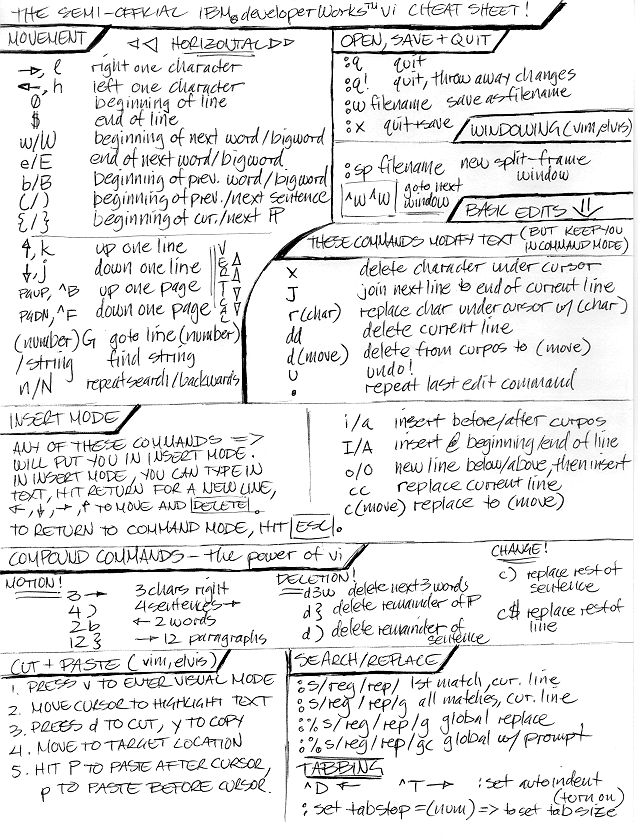
First start with this wonderful collection of Vim cheat sheets (local html mirror, local zip mirror). Think of it like World of Warcraft for your editing: “Dude, I’m on Level 3 of Vim!” It’s a bunch of cheat-sheets that break down the 100’s of commands into useful groupings that are fairly straightforward to start integrating into your workflow. It’s important for your long-term sanity that you start with “vim”, not “vi” … they’re the same at the core, but behave very differently in the long run– the difference between a Model-T and a Modern Car.
Update 2008-04-16 Also hit the Semi-Official IBM DeveloperWorks vi Cheat Sheet
If you’re just starting out learning Vim, you’ll probably want to practice with something like vimtutor, but for the love of all that’s good in the world, stay away from vigor.
Next read Mr. McPherson’s guide to effective editing with Vim (local mirror), as he’ll give you a taste of what features an advanced user will find useful, and what begins to set Vim apart from most other editors.
Finally, go straight to the source to read Bram Moolenaar’s guide to effective Vim habits (local mirror). It’s a bit dense for novices as he is the primary author of Vim, but his commentary should start to make sense around Lesson 6 or so of the graphical guides.
My small contribution to this wealth of knowledge is the “:Explore”, “:Sexplore” (split and explore), “:vsplit” and “:vnew” for grins and “Ctrl-W,Ctrl-W” or “Ctrl-W,{motion}” (window navigation). Oh, and who could forget vim tip #102, simple tab completion or any of the other hidden gems you’ll find at vim.org.
If you’ve given Vim a week or two and still can’t wrap your fingers around it, don’t throw it away just yet. There’s a project called Cream that uses the extremely powerful “core” of Vim, keeping it’s ability to open multi-megabyte files with ease, but hides all the nasty keyboard shortcuts and actively encourages you to use the mouse and arrow keys like any other normal editor. Think of it as the one true replacement for notepad.exe if nothing else.
You may now return to your regularly scheduled programming.
00:25 CST | category / entries
permanent link | comments?
Like what you just read? Subscribe to a syndicated feed of my weblog, brought to you by the wonders of RSS.