Brioche Buns
- 1 cup warm water (~105F)
- 2 tbsp sugar
- 10 g yeast (active dry)
- 3 1/2 cups flour (all purpose)
- 2 tbsp sugar
- 2 tsp kosher salt
- 1/4 cup butter (softened)
- 2 tbsp sesame seeds (dried)
Mix water, sugar, and yeast, let rest 15 minutes.
(it should bubble)
Sift flour, sugar, salt.
Mix egg yolk with one whole egg.
(reserving egg white as a wash for the buns)
Mix in a stand mixer set to low for 10 minutes the flour mixture, egg mixture, yeast mixture, and softened butter.
(dough should be cohesive, tacky but not sticky, and lightly hold its shape away from the sides of the bowl)
Let dough rise for 1-1.5 hours in a cold oven.
Punch dough, divide into 10 balls (buns), gently flatten.
Let buns rise for 45-60 minutes.
Brush buns with egg whites, top with sesame seeds, and bake at 375F for 12-15 minutes.
14:43 CST | category / entries / recipes
permanent link | comments?
Buttermilk Pancakes
- 125g flour (1 cup)
- 20g sugar
- 1.5 tsp baking soda
- 1.5 tsp baking powder
- 1.5 tsp baking salt
- 300g buttermilk
- 25g butter (melted)
- 1 egg
Mix dry ingredients.
Add wet ingredients and mix lightly.
Let batter rest 30 minutes.
Cook in frying pan over medium heat, turning when bubbling and with dry edges.
11:41 CST | category / entries / recipes
permanent link | comments?
Chicken Picatta
- 1 1/2 lbs chicken breast (boneless, skinless, pounded flat)
- 2 tbsp lemon juice
- 2 tbsp water
- 1/2 cup flour
- 1/4 tsp salt
- 1/4 tsp pepper
- 3/4 cup chicken stock (or bouillon powder + water)
- 1/3 cup white wine (dry)
- 4 tsp flour
- 1 tsp lemon juice
- 2 tbsp Capers / Scallions
Pound chicken breasts flat and marinate with lemon and water for 30 minutes (or overnight).
Mix flour and spices, dredge chicken, pan fry with oil and butter.
Mix liquids and make a pan-gravy after cooking chicken.
Serve over fettucini with capers or scallions.
12:29 CST | category / entries / recipes
permanent link | comments?
Spicy Fried Chicken
- 4 lbs Chicken (drumsticks/thighs)
- Cajun Seasoning (Tony Chacheries)
- 2 eggs (large)
- 2 cups Buttermilk
- 1 tbsp hot sauce (Salsa Valentina)
- 3 cups Flour
- 1/2 cup Cornstarch
- 1 tbsp cayenne pepper
- 1 tbsp oregano (dried, crushed)
- 1 tsp salt
- 1/2 tsp smoked paprika
- 1/2 tsp cumin (toasted)
- 1/2 tsp rosemary (ground)
Season chicken with cajun spices and let rest covered (bagged) and refrigerated, overnight.
Mix flour and seasonings.
Dredge chicken in flour, then buttermilk, then flour again.
Fry in oil in a deep pan until cooked through and any juices run clear.
Drain on paper towels and hold in a warm (~170 ° oven) as you fry all the chicken.
13:50 CST | category / entries / recipes
permanent link | comments?
Pickled Red Onions
- Red Onion (Halved and Sliced)
- 1/2 cup Apple Cider Vinegar
- 1 tbsp Sugar
- 1 1/2 tsp kosher salt
Place sliced onions in heat-safe bowl.
Bring vinegar, sugar, and salt to a boil.
Pour hot liquid over onions.
Cover and let rest overnight in refrigerator.
19:58 CST | category / entries / recipes
permanent link | comments?
“Machete” Mashed Potatoes
- 2 lbs Yukon Gold potatoes (quartered and boiled)
- 2 Poblano Peppers (seared/blistered and diced)
- 2 cups Milk
- 1 tsp kosher salt
- 1 tsp black pepper (ground)
- 8 tbps butter (melted)
- 1/2 cup shredded cheese
- 3 tbsp Queso Cotija (crumbled)
Blister poblano peppers over a gas burner (or very hot saucepan, or roast in oven 450, ~10-15min’s)
Scrape skin from blackened peppers with a spoon (consider using gloves or tongs to prevent “hot hands”)
Remove stems and seeds, dice to appropriate size.
In a medium saucepan, bring quartered potatoes to a boil and simmer for ~20 minutes (until tender)
Drain potatoes and set aside.
In the same saucepan, combine the milk, salt, and pepper.
Warm milk to steaming then add potatoes and diced poblano.
Mash with potato-masher, but do not over-mix.
Fold in butter and shredded cheese.
Top with crumbled queso cotija.
19:57 CST | category / entries / recipes
permanent link | comments?
The Lamp Post
Suppose that a great commotion arises in the street about something, let us
say a lamp-post, which many influential persons desire to pull down. A
grey-clad monk, who is the spirit of the Middle Ages, is approached upon the
matter, and begins to say, in the arid manner of the Schoolmen, “Let us first
of all consider, my brethren, the value of Light. If Light be in itself
good…”
At this point he is somewhat excusably knocked down. All the people make a
rush for the lamp-post, the lamp-post is down in ten minutes, and they go
about congratulating each other on their un-mediaeval practicality. But as
things go on they do not work out so easily.
Some people have pulled the lamp-post down because they wanted the electric
light; some because they wanted old iron; some because they wanted darkness,
because their deeds were evil. Some thought it not enough of a lamp-post,
some too much; some acted because they wanted to smash municipal machinery;
some because they wanted to smash something. And there is war in the night,
no man knowing whom he strikes.
So, gradually and inevitably, to-day, to-morrow, or the next day, there comes
back the conviction that the monk was right after all, and that all depends
on what is the philosophy of Light. Only what we might have discussed under
the gas-lamp, we now must discuss in the dark.
[source…]
10:37 CST | category / entries
permanent link | comments?
Birote Salado de Zona Guadalajara
These don’t take a lot of effort, but do take a lot of time.
First Stage Dough
- 250g flour (sifted)
- 8g dry yeast (1 packet)
- ~300g water (to make sticky)
In a large bowl, add all ingredients and mix well until you have a soft, elastic dough.
Cover dough with a damp towel and let rise for ~6 hours at room temperature.
(alternately: let rise in refrigerator overnight for up to 3 days)
Second Stage Dough
- 500g flour (sifted)
- 15g dry yeast (2 packets)
- 10g salt (~1tsp)
- ~600g water (to make dough)
Mix Second Stage Dough completely into first stage dough.
Separate into ~6 elongated rolls.
Cover with a moist towel and let rise in a slightly warm, humid place until approximately doubled in size.
Bake in a steamy oven (eg: with a tray of water underneath) on a floured surface for 15 minutes at 250C (~450 F).
14:36 CST | category / entries
permanent link | comments?
New Appreciation for Zippered Cases
I was gifted some leatherworking tools for my birthday (thanks Phil!), and thus begins the process of combining everything into bundles of “stuff” that each make sense. All the scissors/cutting tools in one bag, all the stitching/needles in another, all the punches/awls in yet another, yadda yadda.

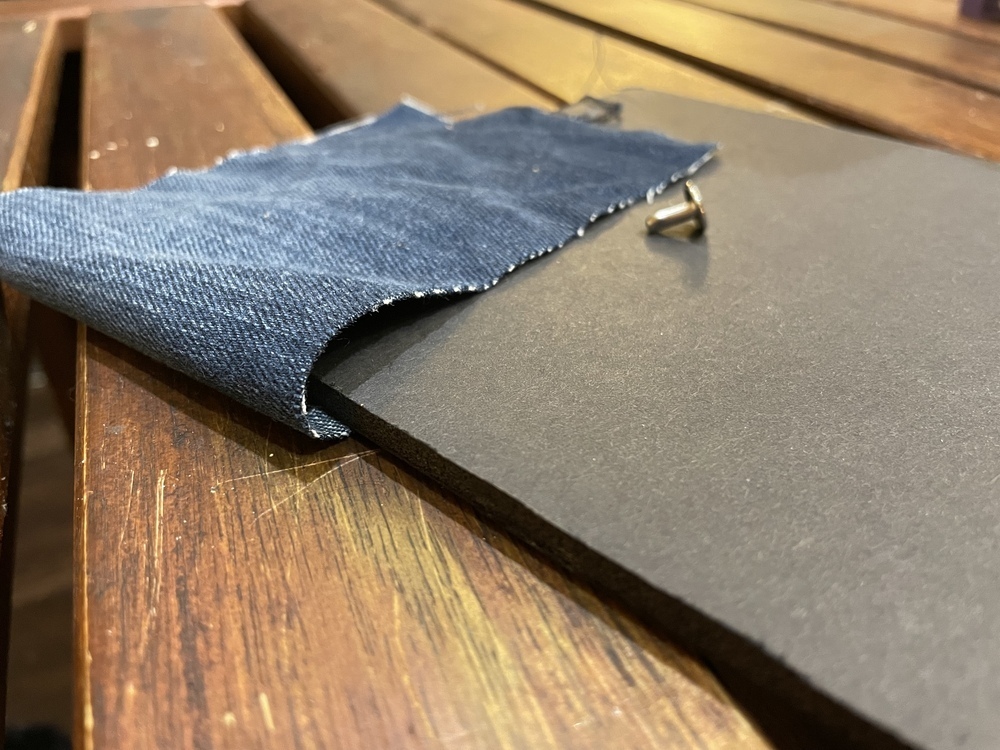
What better way to get practice at using all these tools than to make cases for them? I made the above case “from scratch” using salvaged materials. Some leftover foam-board, denim from a pair of old pants, scavenged zipper from… something. Basically the rivets, washers, and elastic were “new”, but everything else was in various bags/buckets/boxes of scraps.
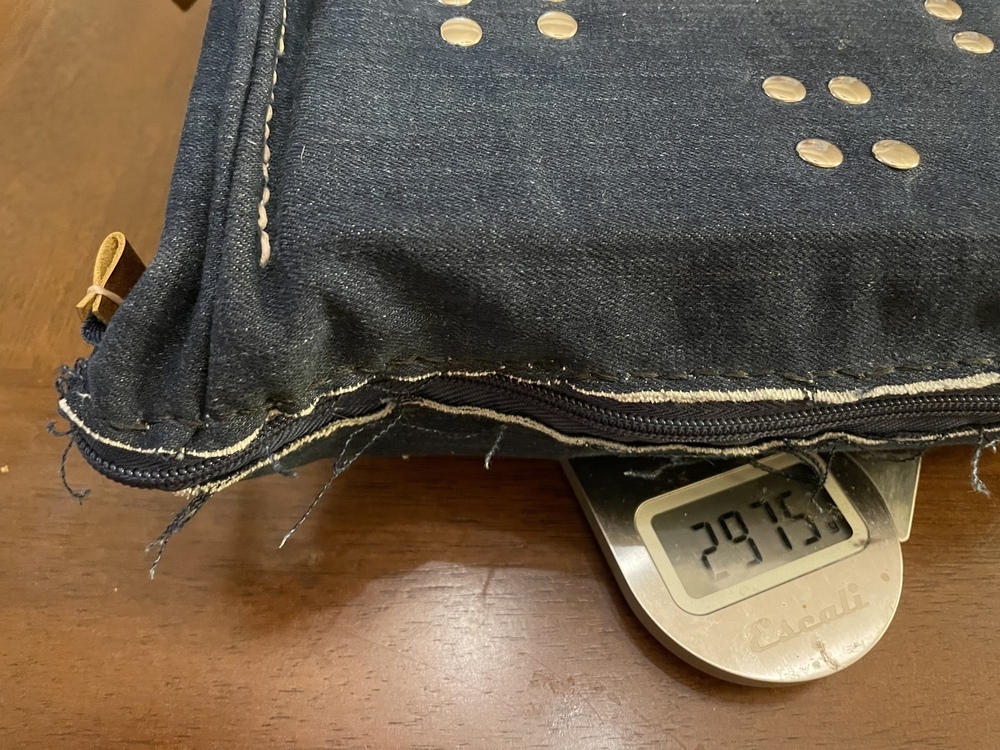
…but what’s in the case? Big, Chonky, Setup/Gauge Blocks! (seriously, this thing weighs ~3kg, ~6.5lbs!)
Why do you need 3kg of chunks of metal? Well… there was this technique that I saw which probably borrows quite a bit from machining (making things out of metal) where you use “known good 90-degree” objects and “very straight bars” to help make your various cuts quicker and more accurate.
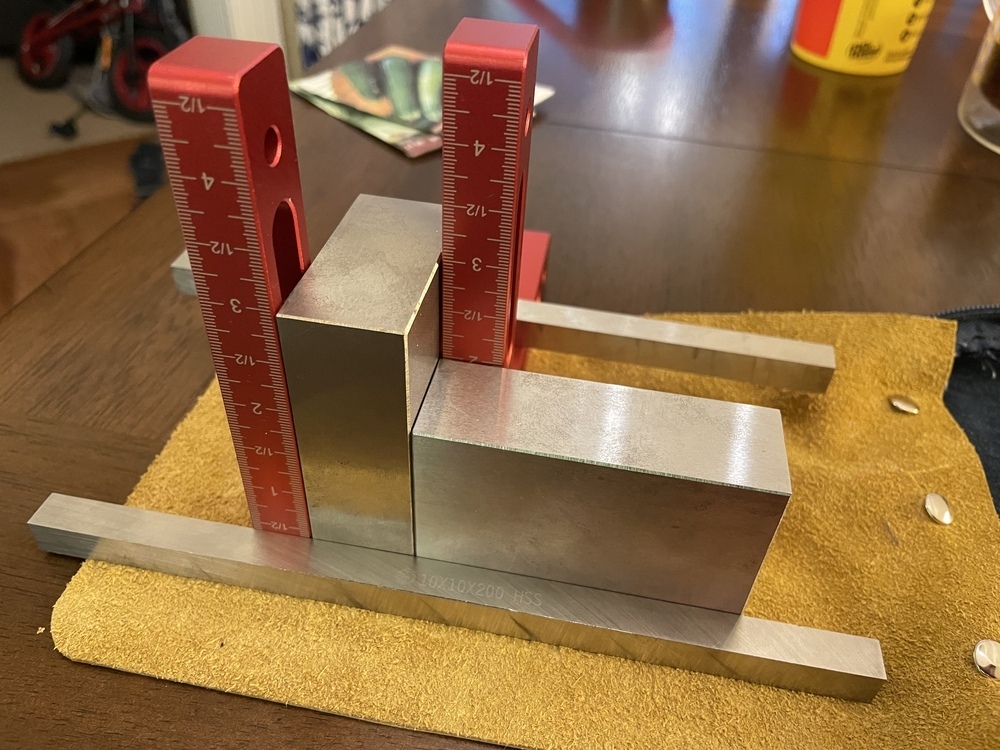
The red ones are basic 90° brackets, and the big chunks of metal are called “3-2-1” blocks, each edge measuring exactly 3, 2 or 1 inches (to within some thousandths of an inch). Overkill on precision for general leatherworking, but because they weigh quite a bit you can use them to help in gluing, holding things in place, or guiding other “very straight” pieces of metal in the right direction.
The long bars are kindof cheating. They’re actually steel blanks for making your own drill bits turning stuff on a lathe, so they’re not truly “precision”, but they were 20cm long and 1cm cross-section and were an order of magnitude cheaper than actual “gauge bars” (especially at the longer lengths).
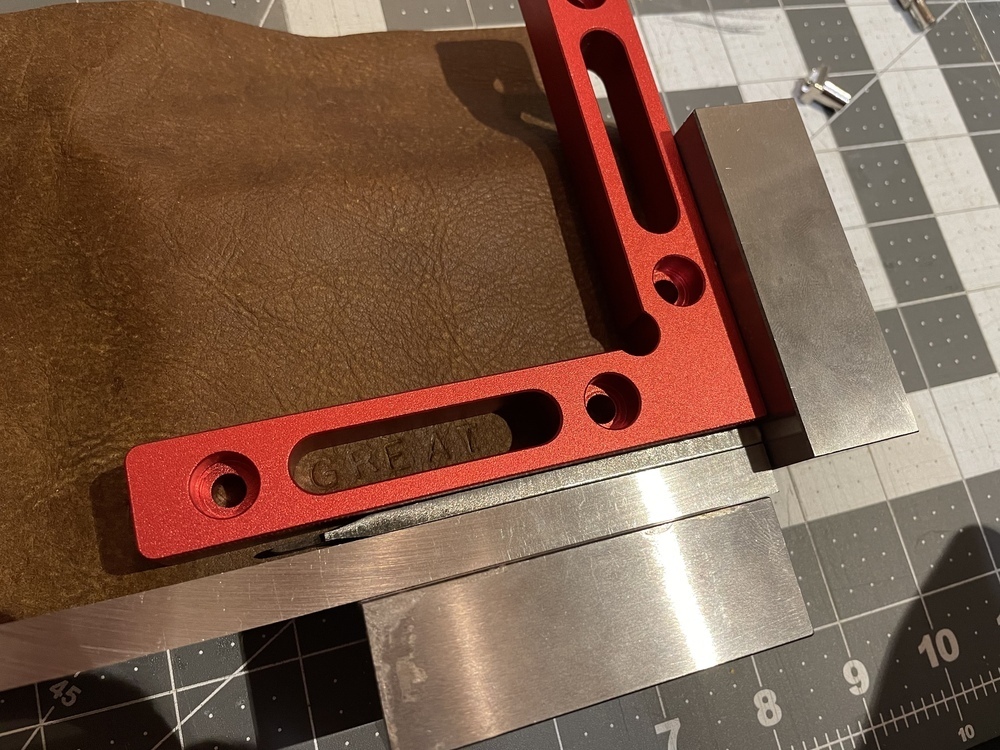
What do you use all this stuff for? Run the leather into the corner. Use the red 90 to consistently offset. Use the 10cm long bars as per-line spacers (and cheat again by using a two-prong pricker to nudge it up a little more). Basically, you get pretty good consistency and repeatability and have tons of options for squaring up your cuts or getting good measurements.
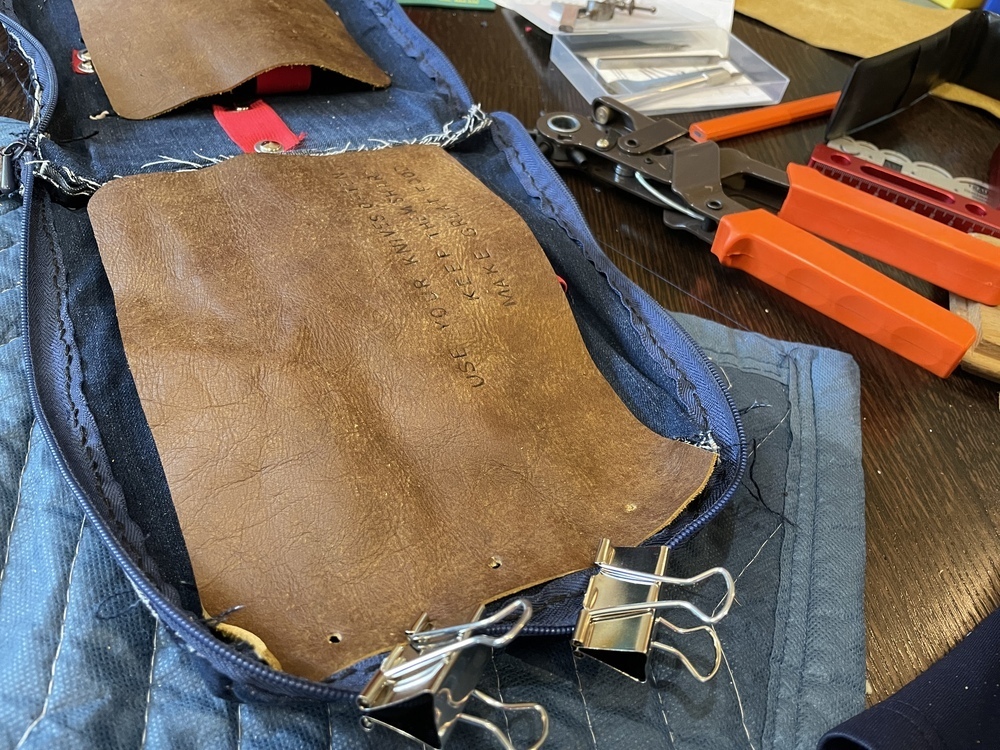
It took a few days to figure a good arrangement that would fit with the various scrap sizes and trying to protect the blocks as well as possible, but once it was started, it also took a few concentrated work sessions to finish.
- Layout
- Cut + Dry-Fit
- Stitch-the-denim
- Stitch-the-zipper
- Rivet, rivet, rivet…
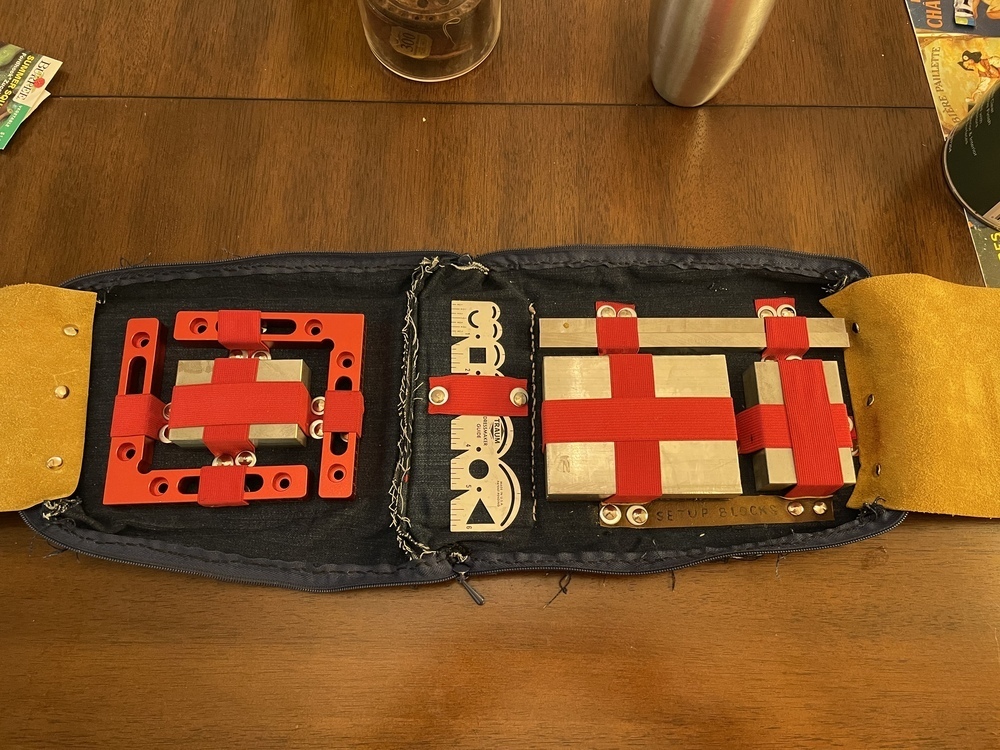
What does it look like inside? All the metal is heavy and “precision” so I didn’t want it rattling around against each other in a box with all my other tools. Therefore: make a zippered container for it, with all the blocks held down by elastic.
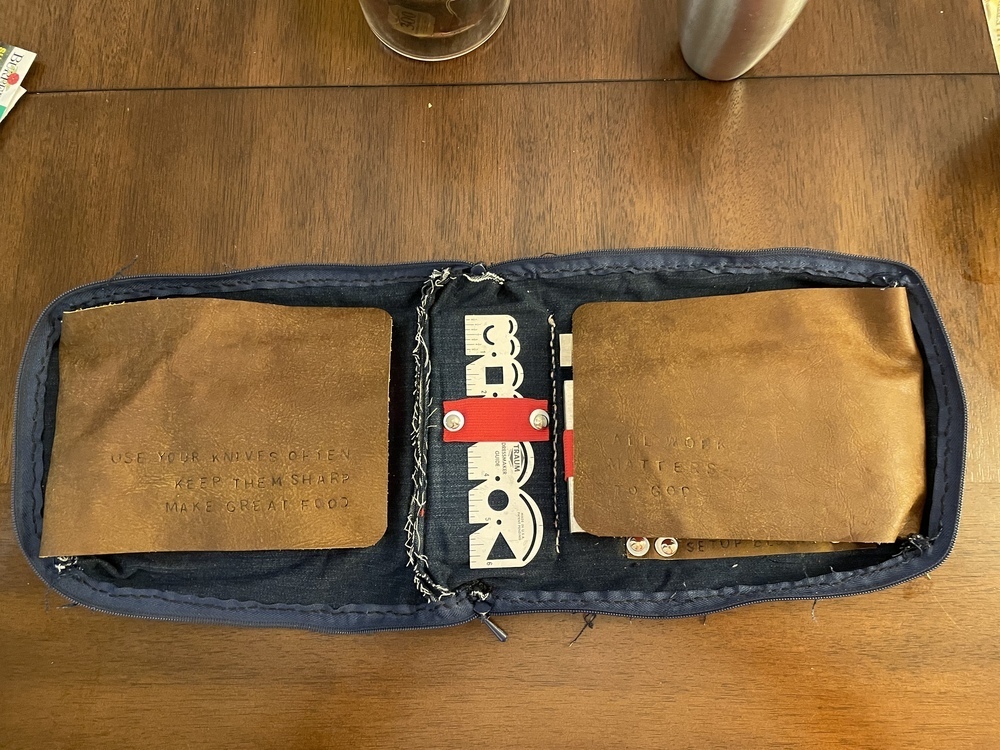
Since the metal is “precision”, I also didn’t want the faces rubbing against each other while the case was closed so I “faced” the blocks with some protective leather. …and since the kit I got for my birthday had a letter punch kit (thanks again Phil!), I figured I’d put two quotes in there.
- “Use your knives. Keep them sharp. Make great food.” - This came in a knife-block that I bought, and is a great reminder that the best tool is one that’s used.
- “All work matters to God.” - This case isn’t the best made, but it is made. A reminder to not be afraid of imperfection, and that sometimes ephemeral work is its own reward.
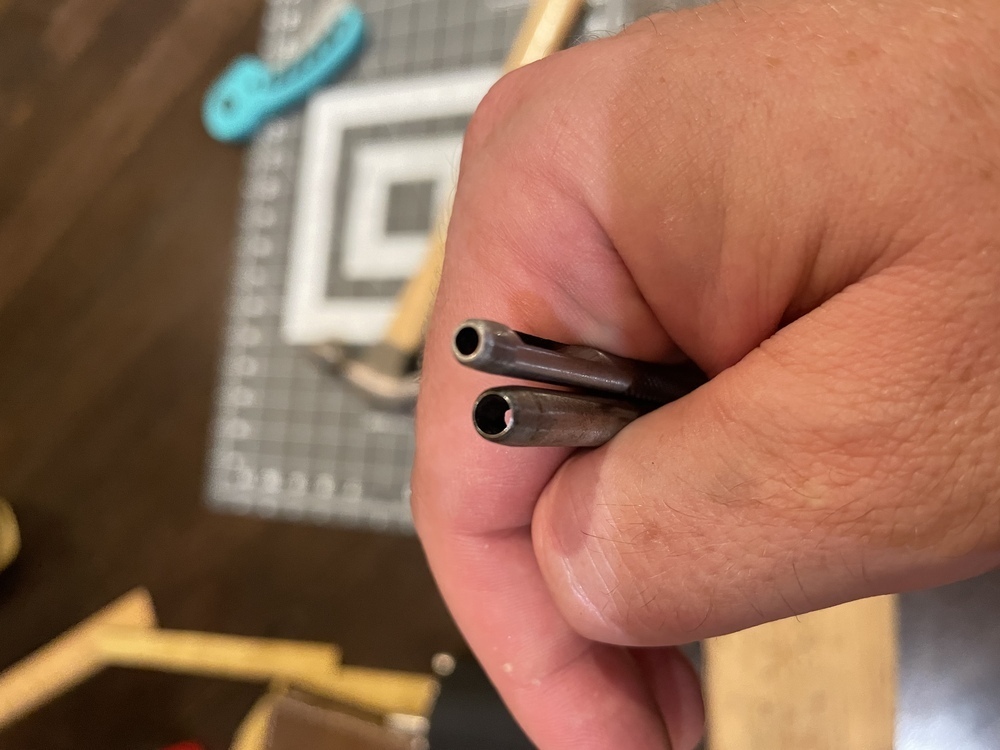
…so have you ever blunted the heck out of a hole-punch by using it backwards?
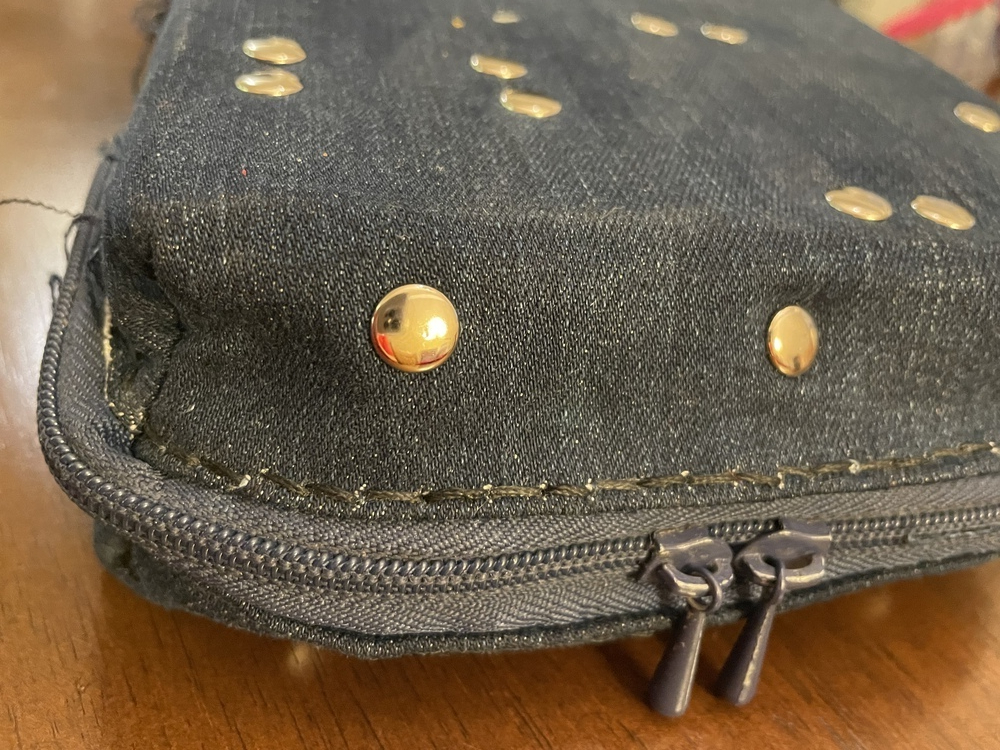
Stiching is all hand saddle-stitched (by eyeball on the zipper-denim seam)
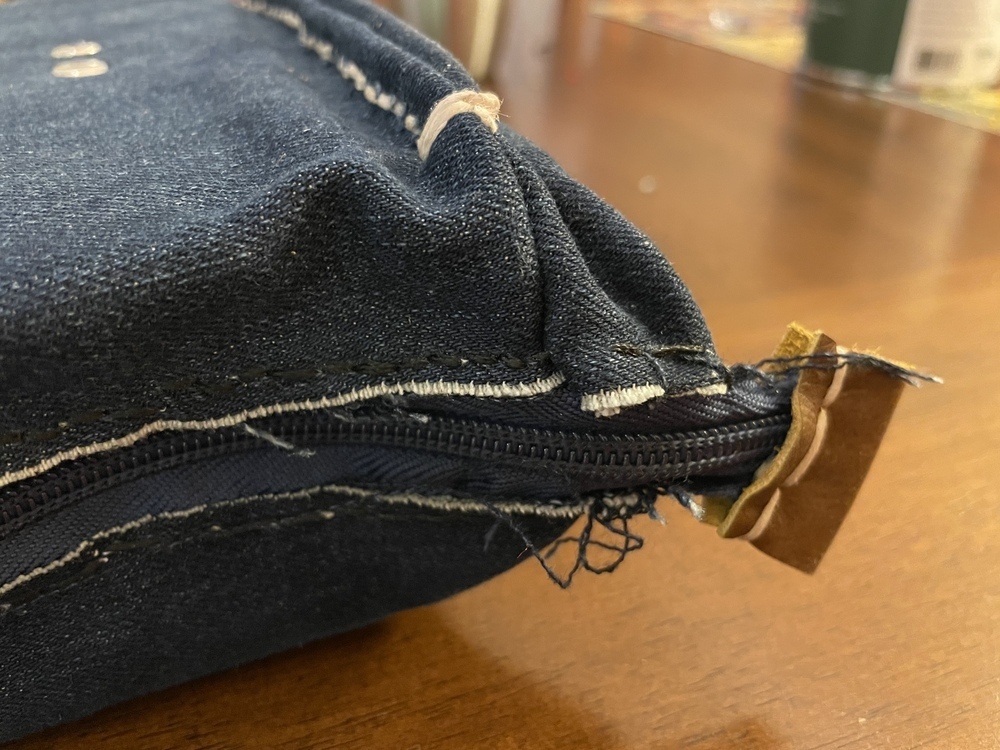
…and some little leather details to keep the zipper from running off the edge.
All in all, I learned a lot, and have a new appreciation for what goes into a “simple” case like this.
22:30 CST | category / entries
permanent link | comments?
Cowboy Brownies
- 2 eggs, lightly scrambled
- 1 tsp Vanilla Extract
- 2/3 cup all purpose flour
- 1/4 tsp baking soda
- 1/4 tsp salt
- 2 tbsp butter, melted
- 2 tbsp water
- 1/2 cup sugar
- 6 oz semi-sweet chocolate chips
- 6 oz semi-sweet chocolate chips
- 1/2 cup walnuts, chopped
Line 9”x9” pan with foil and oil, set aside.
Preheat oven to 350F.
Lightly scramble eggs with vanilla, set aside.
Mix and sift dry ingredients, set aside.
In a saucepan, bring to gentle boil the butter, water, and sugar.
Remove from heat and add half the chocolate chips.
As chocolate chips are cooling, stir in eggs.
Incorporate the flour mixture by thirds.
Add remaining chocolate chips.
Bake 25-30min at 350F.
21:52 CST | category / entries / recipes
permanent link | comments?
Like what you just read? Subscribe to a syndicated feed of my weblog, brought to you by the wonders of RSS.